

Hi! I'm Gremling, sorry I haven't made a blogpost in a while, life's been very busy. So much to talk about and I'll be rolling out weekly blogs talking about the year, gosh it went by so quick!
Anyhow, you're not here to read about me, but, more about this title, huh? Yeah, well I've been almost entirely degoogle'd now for almost over a year and I wanted to share some advice at how you can basically get away from the google telemetry and avoid having to use their services. Though, I will admit, it is very convenient. I still use google maps, I should use mapy.cz more or even just open street maps.
This guide isn't a strict guideline! It's moreso just, what can you do to to just reduce the amount of dependency on google, especially with the new AI search system rolling out, ew! It removes the point of being able to search for blogsites if they just explain it all for you. Gross.
I still use google services though. This is what I mean by "almost", I can count on my hand the services I depend on. Android, Google Play Store (I have bought apps I need to use), Android Auto, Maps and some single sign on websites such as Tailscale.
But that's where you have the choice if you wish to remove that and look for an alternative, I am planning on cutting out maps on my new phone, as I hate the tracking of it all. But I haven't done research on that yet.
What's the point?
Well, jeez, how do I word it? Well, discord's using google's infrastructure which they explicitly mention in their privacy policy that they share relative user information to google for their services. Which also include their content filtering algorithm and that google scans every image you upload to discord. Yep.
Your internet usage for targetted ads by google services is worth a fortune. I don't personally like how much data they collect off of me and the fact that we're pretty much getting told "Use this or you get nothing" SUCKS. There's plenty of open source software out there which can make use of google's services without their grubby mittens smearing all over it.
The same can be said with microsoft, but I kinda don't wanna highlight this as much as microsoft is easy, just switch to linux. Don't bother too much about the OS, Linux users obsess over their distros, just pick the one which sounds nice or looks the nicest. For me, I really like Manjaro as it's very similar to the OS the Steam Deck uses cause it's Arch and uses KDE Plasma (My fave desktop). But this is gonna have to be a seperate blog.
We don't have "technological independance" anymore, everything is either a subscription service or nothing. None of the games you "own" on your steam library are even owned. You can lose them all in a blink of an eye. Even some VSTs for musicians, if you lose the DRM, boom, you lose the instruments you bought and used.
Amazon is pushing eBooks even more and changing published books, history can be easily rewritten and we have no way to kind of..stop it! So, this is why I'm in a mindset now of, how can we responsibly use software in a way which is more focused towards a user owning a product rather than providing them a service to use the product.
Okay, but where do I start?
Well, look at what you use! Do you use Gmail? Look into Proton mail and you may have to cough out a subscription fee if you want the nifty features, but they're charging you money instead of collecting all of your information. Which to me, is a fair trade, you can also seek out alternatives. Some ISPs offer a mailing service, Yahoo mail merged with Sky, a popular UK ISP and I believe BT also feature one.
For me, personally the search engine is the one I think is going to be a popular one and I have a perfect suggestion. SearXNG! You can use publicly available instances here, or. Why not just run your own version? You can follow a guide to install "Docker" on your OS or if you use windows, just simply use docker desktop. SearXNG have a really good installation instructions also covering how to install docker on your machine and also run the docker container. Then you can access it locally.
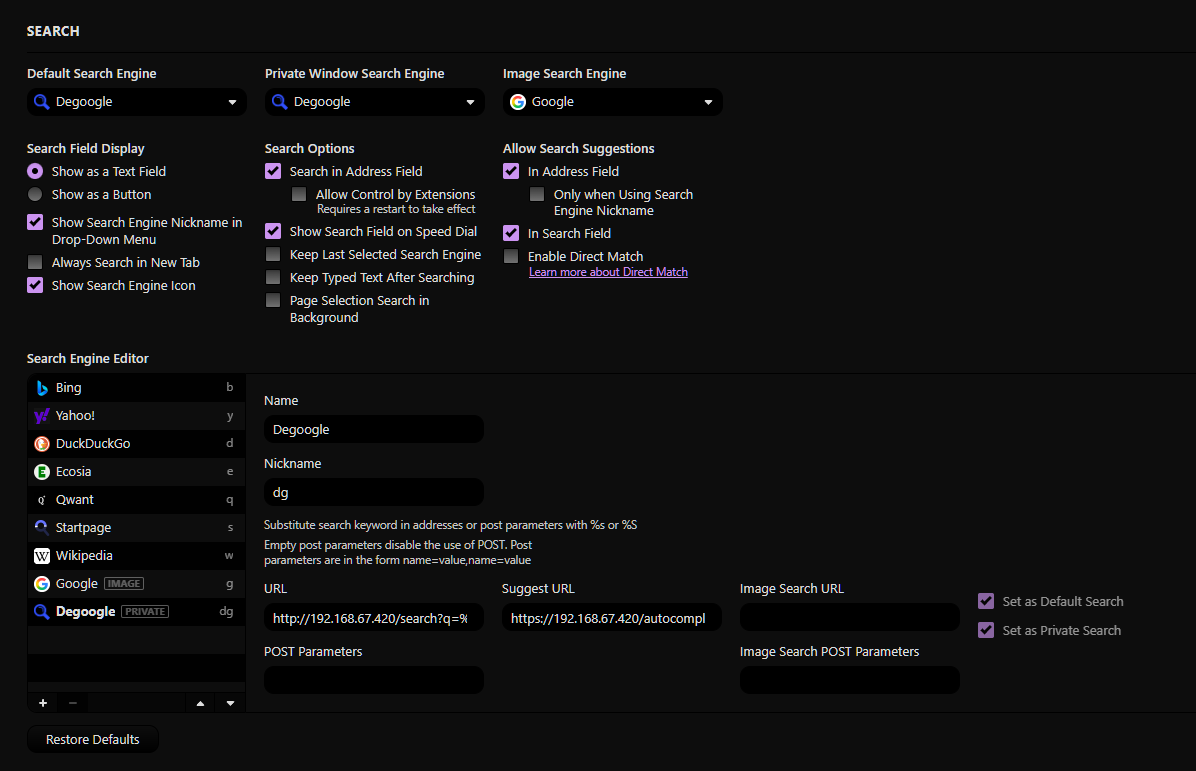
Vivaldi (A really good browser!) enables you to change your search engine to something custom. You can see below how I set that up, notice I'm using my local IP of my machine in the address. I never use Image Search but you can always configure that with SearXNG if you add the image search URL.
URL is: http://192.168.67.420/search?q=%s
Suggest URL is: https://192.168.67.420/autocompleter?q=%s
Remember to change the IP address to the machine running your SearXNG instance!
So now that I got one example, what I'll do here is list a bunch of services I've found alternatives to which seem useful. A lot of things I found was from "awesome" lists on github, I usually search things like in one example, "Awesome Selfthosting github" and there's an entire github listing useful services you can run on docker internally on your machine. Remember it all starts off simple! And then you just get carried away once it makes sense!
YouTube (Grayjay)
I personally use GrayJay, it's a frontend which is made by blessed FUTO.
Really easy to setup! You install Youtube as a source and sign into it if you wish to get your recommended page. You don't even need that though usually. But you can import your subscriptions and have every person you subscribed to be in your subscription box, combined with other creators and different platforms. I love this software cause it stops me from brainrotting on shorts all the time.
Someone designed a static github page listing all the sources you can use on the platform. They're all community contributed to and if you want to and especially if you're smarter than me; I highly recommend contributing and supporting their support!
Spotify/YT music
(Navidrome + Feishin/Symfonium)
This is a tough one to explain and justify why I mention spotify. Just..Download your songs!? Honestly it sucks right now as I would recommend "lidarr" which is for downloading music, but their metadata servers don't work so you can't easily just find song artists you like to listen to :( Streaming music is convenient, but, it's your choice whether or not to replace it with a traditional format.
But, when you do have those downloads, you can run a navidrome instance on docker, point your music path to a place you have your music and use a client like Feishin or MusicBee to connect to it. Navidrome uses what we call "subsonic" server which streams music to you, Navidrome comes with a really good website you can connect to directly; but I prefer a dedicated desktop client. You can also, if you use Tailscale and run your machine 24/7, connect to it with Symfonium, a spotify alternative app on your mobile which lets you use it like a spotify server.
But ultimately, an MP3 player can't harm you, you can get some really nifty ones super cheap from AliExpress which are really good in my opinion, I rock the little tiny clip on ones for music, and a digital one for audio books! Remember to support your favourite song artists! Bandcamp is a great place to buy your songs and own them.
Discord- Wait what (MATRIX!)
Yeah! Discord is heavily dependant on google and I can very much confidentally tell you it's going to get worse now. Every image you upload to discord is scanned and used by Google, it's very clearly written in their policy. I'm not a fan of that no not at all. Especially when they're going public soon and google's starting to internalise their services such as Tenor and a few others.
This is why I suggest Matrix! It's an open source platform, kinda like mastodon but for messaging. You got the home server (You can host your own if you wish to) and a client. The home server is the host of your accounts and spaces, which are kinda like your usual discord servers. Each space have a certain version which enables specific clients to work with it. You can use the default homeserver, from Matrix which is pretty good already. And there is a wide range of clients you can select from, I much prefer Cinny on desktop and Fluffychat on mobile, but I have issues with notifications on FluffyChat and I'm thinking of shifting over to Element X; but it doesn't have emoji support yet unlike other clients..! W a a a a
If you wanna add me on matrix by the way, feel free! @gremlingthing:matrix.org
Google Drive/OneDrive (Nextcloud)
So, this is advanced and actually I would say probably the most difficult one to setup. You need a network drive to do this and a lot of patience and thonking.
OneDrive, the way you have your files on your machine automatically sync online/offline files is actually a very complicated system but you can get open source tools such as Nextcloud to do it all for you!
You must have time to do your research and understand how to reverse proxy in an internal Tailscale server to do this properly otherwise you get thrown a bunch of PHP errors.
I highly recommend using the Nextcloud AIO docker which makes life so much easier imo. But it is still a ballache to setup and it took me a few months of trial and error to finally get it working.
I love this service as it's just easy to share files and..I own it! It's my independency here and I have full control of the files and it can be ran without internet needed!
News! Wait thats not Goo- (RSS)
FRICK ONLINE NEWS SITES
USE RSS I BEG
You can use a docker container like FreshRSS as a web-based interactive way to hoard all your RSS across devices, or alternatively, just subscribe to the sites using the RSS button. It's old tech but still very good! Even Reddit supports RSS, youtube and twitter too!! EVEN MY BLOG HAS RSS!
This heavily helps you get away from social media but keep up to date without having to go onto those apps themselves. Plus they don't get that much telemetry or ads forced down your gob.
Every browser has an RSS reader built into it, I recommend googling it for your preferred browser.
Wikipedia/Stack Overflow (Kiwix)
Yeah, so, about that independency, we're in a time where data can constantly change and there's no true way to archive information, well, this is one way!
Kiwix developed a file format called "zim" which makes archiving wikipedia pages and other online sources a lot more easier and powerful and because of the threat of losing access to information, it's been pushed by many people.
Kiwix has a program which can run independantly on your computer and download zim libraries for you called "kiwix JS" where you can literally keep a copy of the entirety of wikipedia on your computer.
You can also run it as a docker container like other open source tools mentioned on this page, and have it accessed online if you need to! I have NHS Medication archived, programming references, wikipedia and stack overflow all archived on my machine.
Fun fact, Wikipedia with pictures is only 124GB in size. Atleast, the 2026-02 zim archive of it is at the time of writing!
That's all cool, but I wanna use this on my phone too!
Learn tailscale, headscale or tailbird! They're a VPN you run yourself, which create a internal network of devices which can connect to one another. You can install tailscale on every device. I use it to connect to my internal apps without exposing them to the internet, very simple once you learn them.
I personally vouch for Tailscale, but the login requirements require you to use a megacorp account to sign in which SUCKS, I tried setting up a SSO service like VoidAuth but tailscale requires the root domain to work, so.. ❌ Boooo.. I like how it has mullvad built in though, makes it nicely integrated.
Overall, I wanted to say is that it's okay to seek alternatives. It's okay to use google if you wish to, but, you're depending on them to keep your data safe. An example of this trust is that you need to trust them keeping your passwords and online credentials safe, unlike this random database breach. We don't really know who owns this database, but a security researcher stumbled across an exposed database featuring a lot of login information for government emails, personal accounts with passwords all easily accessible and surprisingly no information on who owns it. But it had access to lots of google accounts and facebook logins...
Your phone contains the power to know every part about your life, and don't be shocked if google or facebook wants to be involved in getting all that information. I personally think they made that very obvious with the new android 17 announcement. That's.. the overall point of where I'm going, android is owned by Google. They track where you walk every day with your phone, you like google, so, lets start tracking more about your daily life and help you more right?
Gross. I want out of it, and I'm still learning ways to get away and escape. Unfortunately I'm not getting any luck with Android.
That said, I'm not saying to boycot google by any means, I still use google services, it's just limiting the usage of it all and being more conscious of where it's being used, and I'm taking steps to improve my data literacy on the internet.
I hope this post encourages you to have a look at other software and seek out how to kinda minimalise the amount of data big tech collects off of you. Thanks for reading my yaps!

Update: LTT's spinoff channel has a video talking about Docker! It's a great entry way into understanding docker. It's super simple once you understand it, but I remember when it was really intimidating to get into. I suggest watching this to grasp a fundamental understanding first.
Really good entry way into learning such a powerful tool!!